WHOAMI Challenge 2026: A Rusty Beginner’s Blue-Team CTF Walkthrough
Oct. 23, 2026

A rusty beginner's blue-team weekend
I entered a digital-forensics CTF knowing almost nothing, spent three days investigating fake breaches between baby naps, and came out able to pull an AES key out of a packet capture.
Here is the honest version, with the screenshots and the exact steps🙃
Update
It worked out. This run put me 23rd out of 108 and into the top 50, so I am going to the in-person final in Brussels. Same scrappy plan, better city?🫣
Two perfect scores, one miss by a point
Nine scenarios finished out of sixteen. Here is everything, exactly as the report has it.
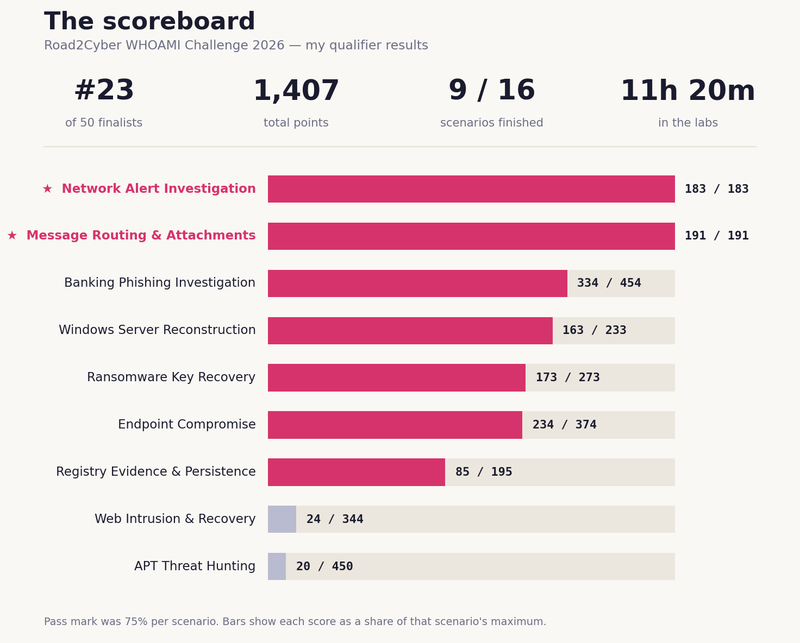
The pass mark was 75% per scenario. Banking Phishing landed at 334/454, about 74%. I think about that one a lot.
I have written up three of these as full walk-throughs below; if you can load a similar lab, you can follow along. The rest is the quick tour.
Ransomware Traffic & Key Recovery
173 / 273 · Digital Forensics
What it teaches: how a phishing document turns your files into junk — and how to pull the decryption key straight out of the captured network traffic.
This is the one where it clicked. The victim machine greeted me with files renamed to .DEMON, a ransom note signed "Devil-Domain Team," and — helpfully — a desktop full of analysis tools and a packet capture of the whole infection.
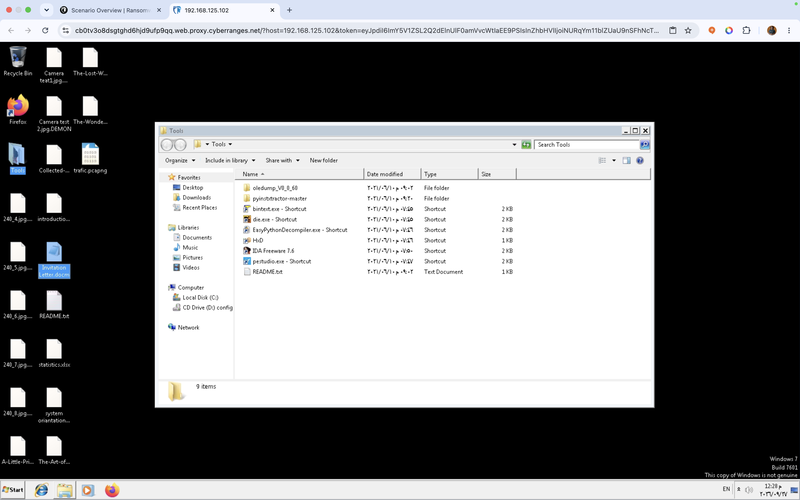
Map the traffic first
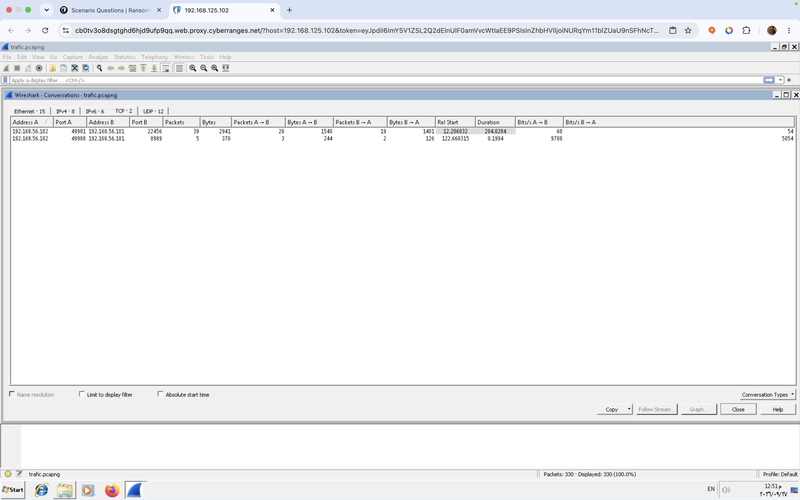
Open the capture in Wireshark and go to Statistics → Conversations → TCP. Do not read packets yet — just see who talked to whom. Two connections, both from the victim (192.168.56.102) to the same attacker host 192.168.56.101, on two different ports: 22456 and 8989.
Follow the quiet stream — it's the jackpot
Select the short connection on port 8989 and click Follow → TCP Stream. The malware phones home exactly once, and it hands over everything in a single dollar-separated line.
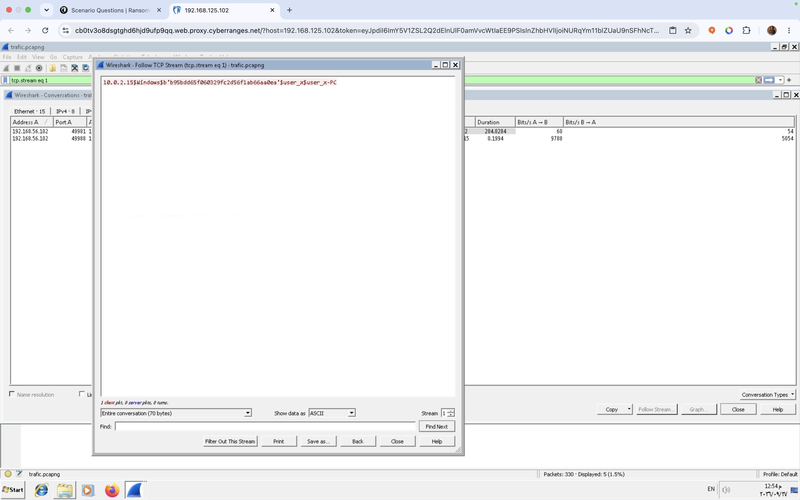
That one line answers four questions at once. The command-and-control server is 192.168.56.101:8989. The data categories sent are IP address, operating system, key, username and hostname. And the key itself is b95bdd65f060329fc2d56f1ab66aa0ea. One catch worth knowing: the b'...' wrapper around it is just Python's way of printing bytes — submit only the hex inside.
Lesson
A scanner score or an odd-looking lookup is a lead. A completed transfer you can actually read is evidence. When two trails compete, chase the one that shows the mechanism.
Find the way in: read the macro without running it
The lure was a macro-enabled Word document, Invitation Letter.docm. You never open it — you read its macro with oledump. First list the streams (the one marked M holds code), then dump that stream decoded.
Command Prompt — AnalystMachine
# 1 — list the internal streams; A3 is marked M (macro)
> python oledump.py "Invitation Letter.docm"
A3: M 2498 'VBA/NewMacros'
# 2 — dump stream 3, decompressed
> python oledump.py -s 3 -v "Invitation Letter.docm"
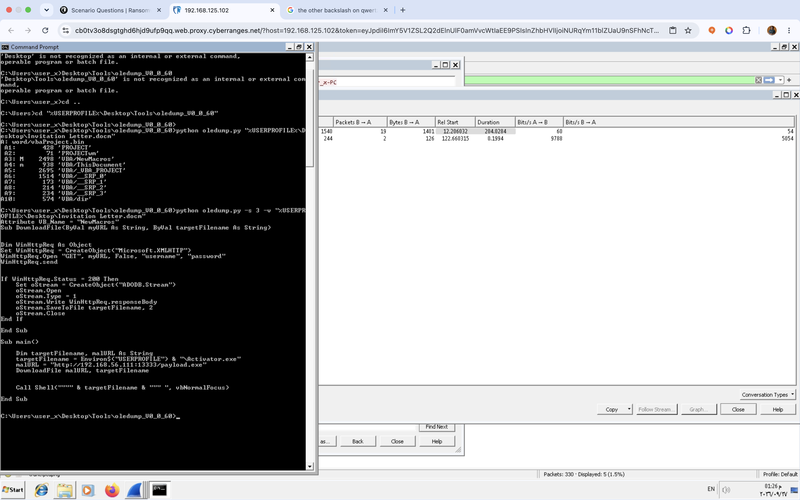
Crack open the payload
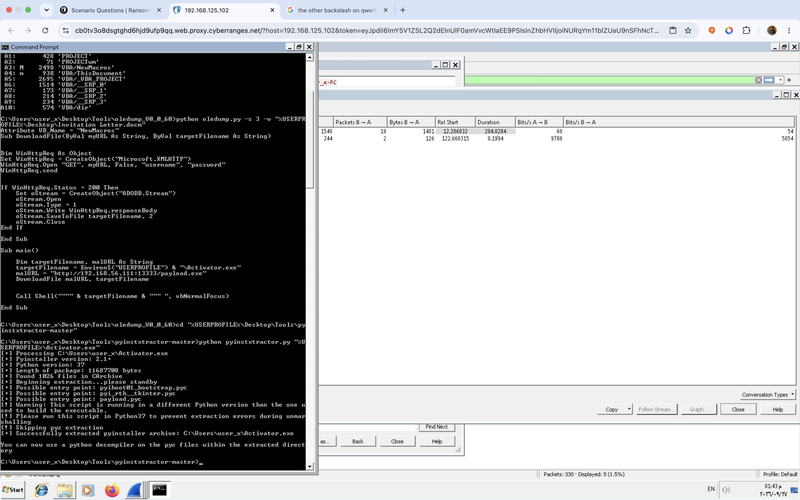
Activator.exe is a Python program bundled with PyInstaller, which means you can unpack it. pyinstxtractor pulls it back into compiled Python (payload.pyc).
Command Prompt
> python pyinstxtractor.py "%USERPROFILE%\Activator.exe"
[+] Possible entry point: payload.pyc
[+] Successfully extracted pyinstaller archive
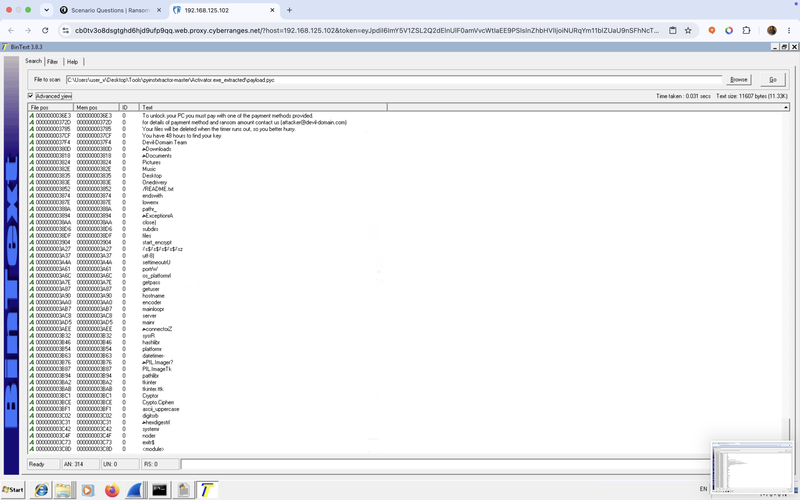
The decompiler choked on the Python version, so I skipped it and read the string constants straight out of the file with BinText. Python stores its text literals in the clear, so the targeted file extensions, the module names and the C2 all showed up as readable strings.
Where it landed
173/273 overall — but 100% on "recovering decryption keys." I got the key out of the traffic, and doing that three days after I learned what a registry hive is felt like actual magic.
Endpoint Compromise Investigation
234 / 374 · Incident Response
What it teaches: how to hunt a Windows box with Chainsaw — and how to win when the tool fights you at every step.
This one happened at 11pm with a tool I had never opened. Chainsaw runs detection rules across Windows and Sysmon event logs and surfaces the suspicious bits. Simple in theory. In practice it threw up three walls, and getting past each one is the actual lesson.
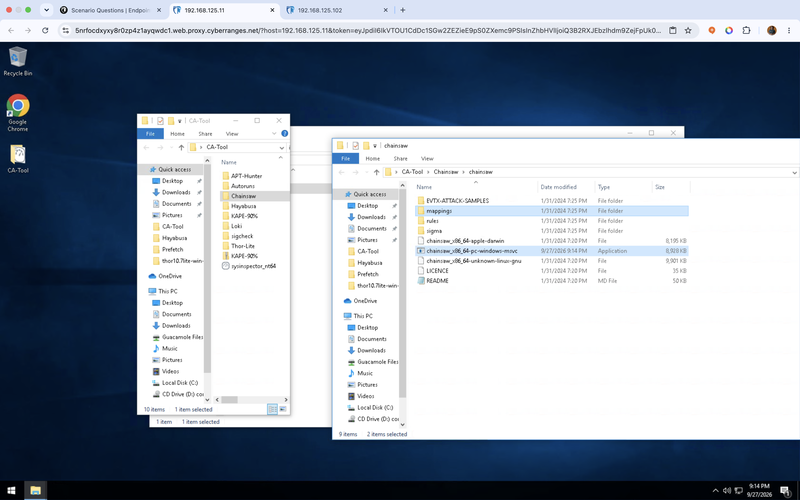
Wall one: everything "failed to read"
My first run returned nothing but errors on every single log file. That is the classic sign the logs are protected: you need an elevated shell. Close the window, open Command Prompt with Run as administrator, and the exact same command works.
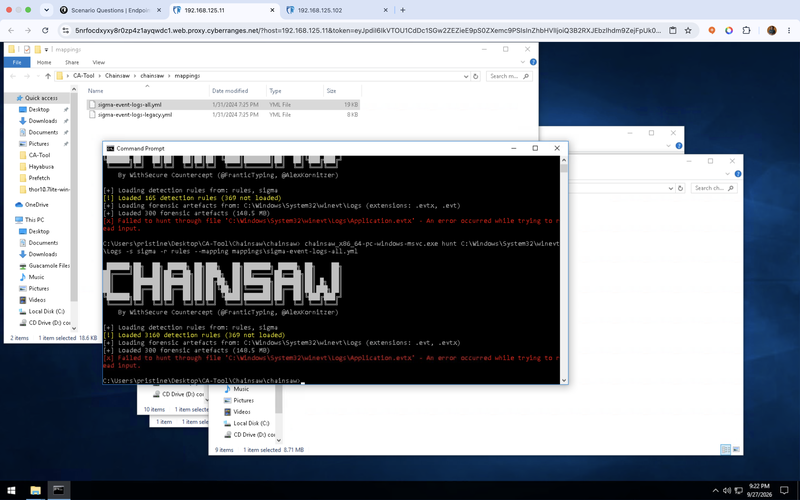
Walls two and three: locked files and too much noise
Even elevated, Chainsaw aborts when it hits a log Windows holds open. --skip-errors tells it to step over those and carry on. And hunting every log returns 733 detections, mostly antivirus and remote-desktop chatter. The fix for both: aim at just the Sysmon log, where the real endpoint activity lives.
Administrator: Command Prompt
# everything, critical only, don't die on locked files
> chainsaw hunt C:\Windows\System32\winevt\Logs ^
-s sigma -r rules --mapping mappings\sigma-event-logs-all.yml ^
--level critical --skip-errors
# ...733 hits, mostly noise. So aim at Sysmon alone:
> chainsaw hunt "C:\Windows\System32\winevt\Logs\Microsoft-Windows-Sysmon%4Operational.evtx" ^
-s sigma -r rules --mapping mappings\sigma-event-logs-all.yml --level critical
Three detections, the whole story
Narrowed to Sysmon, the hunt returned three rows — and they told the entire incident.
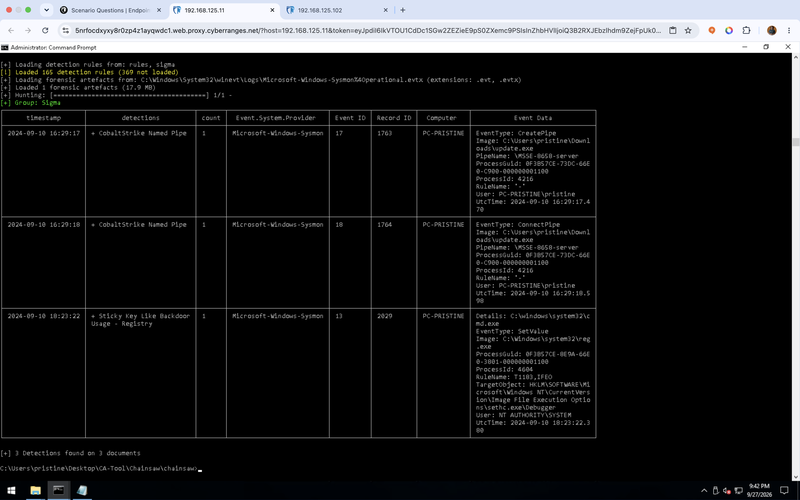
Read the detections column for the alert names, and the Event Data column for the proof: the malicious path, the pipe name, and the exact registry key under Image File Execution Options.
Honest note
I did not clean-sweep this. I pulled the core findings — the alerts, the path, the pipe, the persistence — but several of the remaining answers were guesses, and some missed. 234/374, and I'll take it: I'd never run Chainsaw before that night.
Banking Phishing Investigation
334 / 454 · Incident Response
What it teaches: how to read a phishing campaign out of full packet capture — and how a convincing decoy costs you a pass by one point.
This scenario lives in Arkime, which stores every packet so you can replay the whole thing. Buried in it was a campaign with real craft: a lookalike domain mail.ama1ana.com (look closely — that is the digit 1 standing in for the letter l), a fake Microsoft Outlook login page at 33.78.206.240, and a malware wave carrying a weaponised spreadsheet, swift-messages.xlsm.
I answered nine of the twelve by pulling IPs, senders and filenames straight from the packets. Then I went hunting for the malware's C2 in SPIView → DNS → Host, which lists every domain the machine looked up.
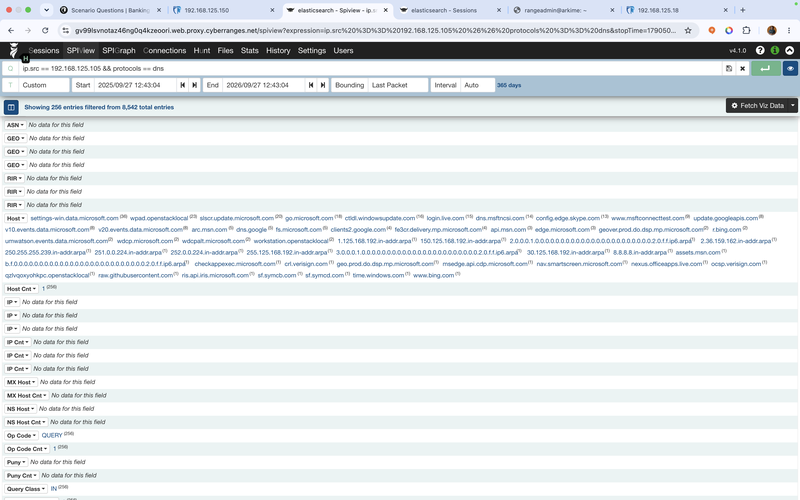
It looked perfect. A random, algorithm-style domain hiding in the telemetry noise is textbook command-and-control, so I submitted it. It was noise — a failed local lookup, not the C2. Final score: 334/454, about 74%. The pass mark was 75%.
The one-point lesson
An anomalous DNS lookup is not proof of a connection. I needed the actual session the beacon made, not the name that caught my eye. One answer anywhere, including that domain, and I'd have cleared it. One point.
The quick tour
Everything else, briefly
The wins I've already bragged about, the honest faceplants, and the bit that made me laugh.
Network Alert Investigation
183 / 183 · perfect
Wazuh and Suricata, reading JSON alerts and mapping the activity to MITRE ATT&CK T1046 (Network Service Discovery). First try, full marks, and the jolt of confidence I needed to keep going.
Message Routing & Attachment Analysis
191 / 191 · perfect
Email forensics with emlAnalyzer: tracing Received headers, reading SPF/DKIM/DMARC, and checking sender IPs (which traced to Israel and Taiwan) against AbuseIPDB. My best scenario of the whole weekend.
Windows Server Event Reconstruction
163 / 233
Rebuilding what was installed on a server from its Setup and Servicing event logs. I lost two answers to a wording trap: "as recorded" wanted the full package name (Microsoft .NET Framework 3.0), not the short code (NetFx3).
Registry Evidence & Persistence
85 / 195
NTUSER.DAT hives in Registry Explorer, dirty-hive transaction logs, Run keys, UserAssist. My first real forensics faceplant — I spent too long finding my feet and the timer ran out.
APT Threat Hunting & Web Intrusion Recovery
20/450 · 24/344
Two big scenarios, both after midnight. Running on fumes, I answered only the Knowledge & Decision questions — then learned they are worth about 4% of each scenario. Reader, I laughed. (The reasoning they test, though — staying inside what the evidence proves — is the actual job.)
What I'd tell my Friday-night self
Seven things the scoreboard taught me
- 01Read the value that's actually on screen. Never submit a "known default." Assuming a standard value instead of reading the real one was my most expensive habit.
- 02Watch for "full name vs identifier" wording. When a question says "as recorded," decide whether it wants the short code or the full name, and read the exact phrasing.
- 03Submit before the clock, always. A perfect answer you never submitted scores zero. Bank what you have with time to spare, then improve it.
- 04An alert is a lead, not a verdict. A gibberish lookup is not proof of a connection; a scanner score is not proof a file ran. Confirm the mechanism first.
- 05If a tool can't read Windows logs, run it as Administrator — and add
--skip-errorsso one locked file doesn't kill the whole run. - 06Cut the noise. Hunting one focused source (the Sysmon log) beat hunting everything and drowning in 700 hits.
- 07AI is a brilliant co-pilot and a terrible autopilot. It explains tools and points you at where to look — but it states wrong guesses with total confidence. Every "certain" answer still needs checking against the evidence. You drive.
So, whoami?
On the Friday evening the challenge launched, I didn't know what a registry hive was. By Sunday night I'd recovered an AES key from a packet capture, read a malware macro without running it, and driven Chainsaw from an elevated shell at midnight; all in the gaps between babysitting haha, it was fun😅.
I didn't win. I passed some, lost one by a single point, and ran out of road on others, but I finished measurably more capable than I started, and the near-misses taught me more than the clean passes did.
If you have been telling yourself you're too rusty or not technical enough to try one of these, that feeling is not a stop sign; it's the whole experience.
So dare!
whoami → three days ago, someone with "no idea."
Now, someone who did it anyway and is packing for Brussels 😁