Fake Adobe Recruiter Email? How to Spot the Red Flags
May 14, 2026

I received an email that, at first glance, looked flattering, polished, and exciting.
It appeared to be from Adobe HR. The branding looked clean, the tone was warm and personalised enough to catch my attention.
It praised my background, suggested there may be a fit for upcoming opportunities, and invited me to schedule a conversation.
For a moment, it had exactly the effect it was designed to have (oh, what a great opportunity!)
Then I looked closer.
What seemed like a promising recruiter message quickly turned into a very useful case study in modern phishing and recruitment fraud. And that is exactly why I think it is worth writing about. These messages are no longer always full of spelling mistakes and obvious nonsense. Some are visually convincing, emotionally intelligent, and carefully designed to exploit curiosity, ambition, and trust :(
In other words, this is what suspicious job outreach looks like in 2026...
The first lesson: branding is not verification
One of the easiest mistakes to make is to trust the logo, layout, or company name too quickly.
This email used Adobe branding and a professional-looking template. But brand familiarity is not proof of legitimacy.
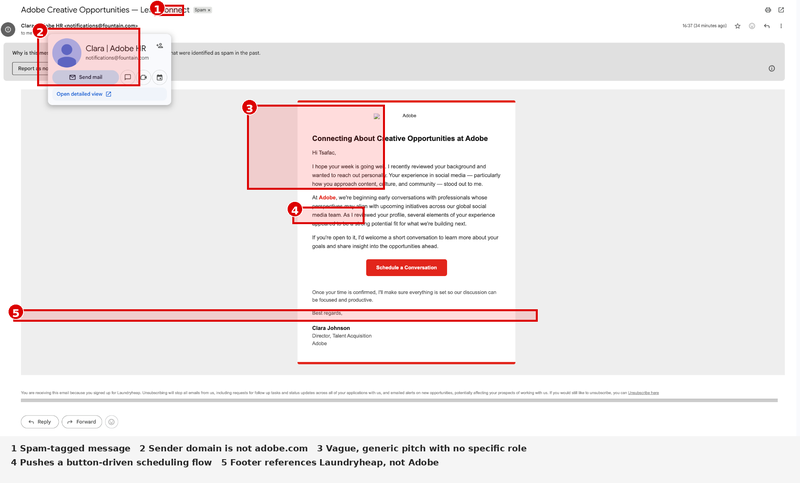
Adobe’s own recruiting scam guidance is very clear: recruiting communications from Adobe will only come from email addresses ending in @adobe.com or adobe@myworkday.com.
That matters because the message I received did not come from either of those. It showed a sender address at notifications@fountain.com, and the reply-to address pointed elsewhere again. On its own, that is already enough reason to stop and verify before clicking anything.
The second lesson: the sender tells the real story
Phishing emails often succeed because people read the display name first and the actual address second.
“Clara | Adobe HR” sounds plausible, but the sender's domain matters more than the display name. A fake sender can borrow a company’s name, a real employee’s name, or a generic HR title. The domain helps determine whether the message is actually coming from the organisation it claims to represent.
In this case, the sender domain did not match Adobe’s official recruiting guidance, and the reply-to domain did not match it either. That is not a minor formatting issue. That is the message failing one of the most basic authenticity checks. Adobe also states that its application process is managed through secure platforms, rather than informal off-channel recruiting exchanges.
The third lesson: vague praise is often a tactic, not proof
The wording of the message is another reason I became suspicious.
It said my “experience in social media” stood out and spoke in broad terms about “creative opportunities” and “upcoming initiatives across our global social media team.” That sounds flattering, but it is also strategically vague. There was no specific role title, no job ID, no team page, no named hiring manager, no reference to an application I knowingly submitted, and no clear explanation of why my background fit that exact opening.
That matters because vague praise is one of the oldest tricks in the phishing playbook. It lowers your guard. It makes the message feel personal enough to be believable, while remaining broad enough to be sent to many people with minimal changes.
The fourth lesson: urgency does not always look urgent
Not all phishing messages shout in capital letters or demand action in ten minutes.
Sometimes the pressure is softer, lol. In this email, the pressure came through a clear call-to-action button labelled "Schedule a Conversation."
That kind of button can feel harmless, especially when the message does not immediately ask for money. But phishing often works by getting the victim to take just one step first: click a link, book a meeting, submit details, or continue into a secondary workflow.
CISA warns that phishing emails use deceptive messages and links to trick users into opening malicious content, revealing personal information, or compromising devices. The FTC has also warned about fake recruiter outreach and fake job offers designed to steal money or data. That means the risk is not only the email itself, but also whatever comes next after the click.
The fifth lesson: small inconsistencies can expose the whole scam
The most obvious giveaway in this example may actually be the footer.
At the bottom of the email, the message says I am receiving it because I signed up for Laundryheap. That has nothing to do with Adobe. And once you see that, the whole illusion breaks.
This is one of the clearest signs that the sender may be carelessly or deceptively reusing a template, workflow, or third-party system. It suggests either poor operational hygiene or outright fraudulent reuse of infrastructure. Either way, it destroys trust.
And that is an important reminder for all of us: sometimes the scam is not exposed by the headline claim, but by the parts the sender forgot to clean up🫣 .
Why does this matter beyond one email
This is not just about one suspicious Adobe message.
In all honesty, it demonstrates how modern job and recruiter scams work. They borrow the credibility of known companies, mimic professional outreach, and target people at exactly the moment when they are most likely to hope the message is real.
According to the FTC, fake recruiters and job scams are active and evolving, designed to get victims to hand over money, personal data, or both.
CISA’s phishing guidance reinforces the same point: deceptive emails do not need to look crude to be dangerous.
The emotional angle matters too. Messages like this are effective because they play on possibility. A recognised company. A flattering note. A career opening. A sense of being seen.
That is exactly why we need to slow down.
What I would advise anyone to do
If you receive a message like this, do not rely on the branding or the sender's name alone. Check the full sender address. Check the reply-to. Search for the role on the company’s official careers site. Look for the company’s recruiting scam guidance page.
Do not click the scheduling link until you have verified the outreach through an official channel.
(or simply check the link, I did by copying the link address without clicking and using a phishing link detector -I used CHECKPHISH, so it shows you where it opens to)
For Adobe specifically, the safest route is to use the company’s official careers pages and official scam guidance, because Adobe explicitly states which email domains its recruiting communications come from.
Final thought
Scams are getting more polished, not less.
That means digital literacy today is not just about spotting broken grammar or obviously fake logos. It is about noticing operational details: domains, reply paths, platform mismatches, footers, workflow inconsistencies, and whether the message actually aligns with how legitimate hiring usually works.
This email looked exciting for a second.
But the details told a different story.
And in cybersecurity, the details usually tell the truth :)